

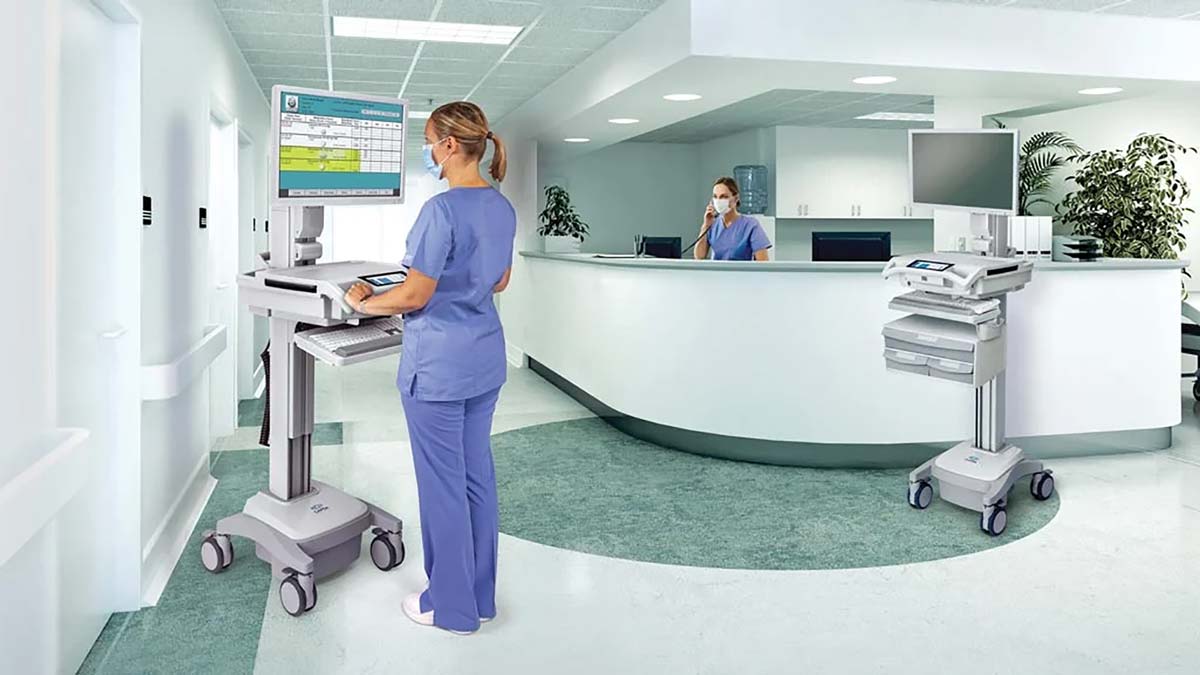
A workstation on wheels — also called a mobile workstation or rolling desk — is transforming the way people work. Designed for flexibility, mobility, and convenience, it’s a versatile solution for offices, healthcare facilities, warehouses, schools, and remote work environments.
Whether you need to move between patient rooms, shift work zones in a warehouse, or reconfigure an open office, a workstation on wheels offers unmatched adaptability.
In this guide, we’ll cover:
- What a workstation on wheels is
- Key benefits
- Common uses across industries
- Features to look for
- Buying tips and maintenance
What Is a Workstation on Wheels?
A workstation on wheels is a mobile desk or computer cart equipped with casters, allowing you to move it effortlessly between locations. It typically includes:
- A flat work surface or desktop
- Adjustable height features
- Storage shelves or drawers
- Mounts for monitors or laptops
- Locking wheels for stability
These stations are built from durable materials like steel, aluminum, or high-grade plastic to handle frequent movement and heavy loads.
Benefits of a Workstation on Wheels
Enhanced Mobility
Move your workstation anywhere without needing to unplug or disassemble equipment.
Space Efficiency
Perfect for facilities where space needs to be rearranged regularly.
Increased Productivity
Keep necessary tools and devices within reach, no matter where you’re working.
Ergonomic Flexibility
Many models have adjustable height to accommodate sitting or standing work.
Multi-Purpose Use
Can be used for computing, paperwork, teaching, medical tasks, or assembly line work.
Common Uses for a Workstation on Wheels
Healthcare
- Nurses and doctors use them as mobile medical carts for patient records, medications, and diagnostic devices.
- Reduces back-and-forth trips, improving efficiency and patient care.
Warehousing and Manufacturing
- Technicians and supervisors use them to monitor inventory, access blueprints, and control machinery.
Education
- Teachers and IT staff move between classrooms with tech tools, projectors, and lesson materials.
Corporate Offices
- Supports flexible seating and hot-desking in open-plan spaces.
Events and Trade Shows
- Useful as portable presentation stations or registration desks.
Features to Look For in a Workstation on Wheels
When selecting the right workstation, consider:
- Size and Work Surface Area – Choose one that fits your equipment and workflow.
- Weight Capacity – Ensure it supports your devices and tools.
- Wheel Quality – Look for smooth-rolling, lockable casters.
- Height Adjustability – Supports ergonomic working positions.
- Power Options – Built-in battery packs or outlets for tech-heavy tasks.
- Storage – Drawers, shelves, and cable management for organization.
- Material Quality – Stainless steel for medical, heavy-duty steel for industrial, and lightweight aluminum for portability.
Maintenance Tips
- Clean Wheels Regularly – Remove dust and debris for smooth movement.
- Check Fasteners – Tighten screws and bolts to prevent wobbling.
- Sanitize Surfaces – Especially in healthcare or shared environments.
- Inspect Power Components – For battery-powered models, keep batteries charged and replace as needed.
Buying Tips for a Workstation on Wheels
- Assess Your Space – Measure doorways, hallways, and work areas.
- Match the Environment – Choose corrosion-resistant models for humid or outdoor spaces.
- Consider Modular Designs – For future upgrades or reconfiguration.
- Read Reviews – Learn from others in your industry about durability and ease of use.
Popular Brands and Models
- Ergotron – Known for ergonomic healthcare carts.
- Luxor – Offers affordable and versatile mobile workstations.
- Anthro/DAL – Specializes in high-end tech carts for offices.
- Rubbermaid – Durable designs for industrial and medical use.
Conclusion
A workstation on wheels provides unmatched flexibility, making it a valuable tool across industries. Whether you’re a nurse moving between patients, a teacher traveling from class to class, or a warehouse supervisor managing multiple work zones, a mobile workstation keeps your tools and technology close at hand.
By choosing the right model and maintaining it well, you can improve efficiency, comfort, and workflow in any environment.
FAQs
1. Can a workstation on wheels support dual monitors?
Yes, many models are designed to hold dual monitor setups securely.
2. Are these workstations battery-powered?
Some include built-in batteries or outlets, while others require plugging into a wall socket.
3. How much weight can they hold?
Depending on the model, capacity ranges from 50 to 250 pounds.
4. Are they difficult to assemble?
Most come with easy-to-follow instructions and can be assembled in under an hour.
5. Can they be used outdoors?
Yes, if made from weather-resistant materials, but indoor use is more common.
Also read: Basketball Shirts Designs: Trends, Styles, and Customization Tips
