

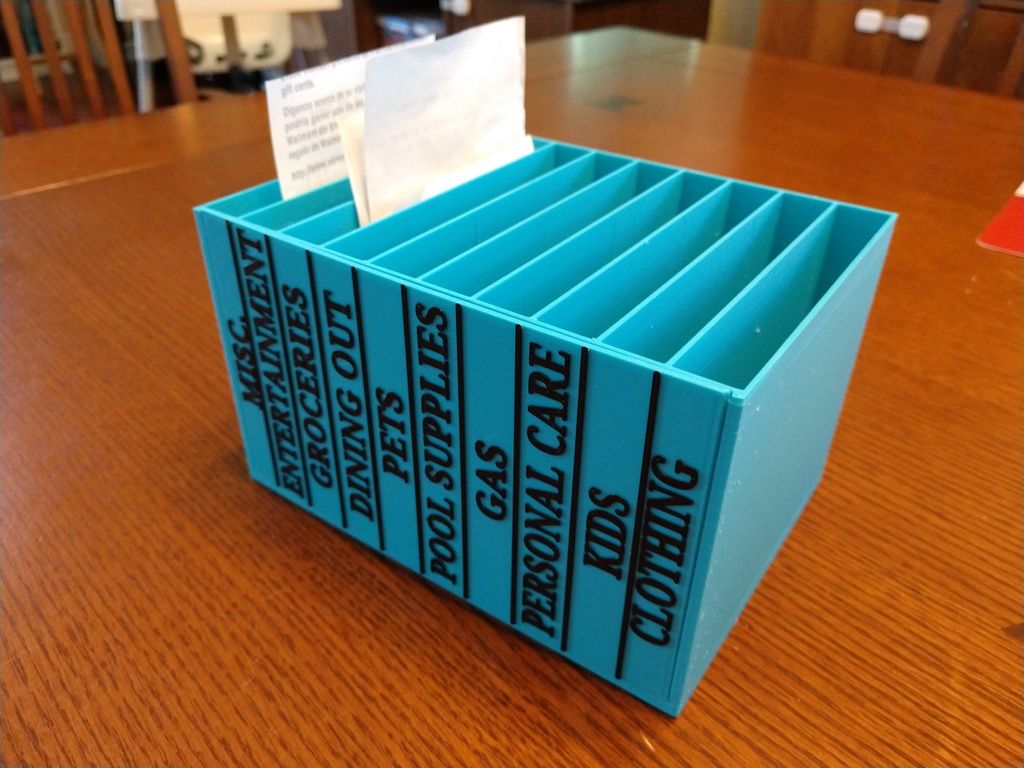
Whether you’re a freelancer, small business owner, or just trying to stay organized for tax season, a receipt keeper can be your best financial ally. From preventing lost receipts to simplifying expense reports, the right receipt management system saves time, reduces stress, and boosts accuracy.
In this article, we’ll break down:
- What a receipt keeper is
- Types of receipt keepers (digital vs physical)
- Best apps and tools in 2025
- How to use one effectively
- Tax and audit benefits
- FAQs to answer your most pressing questions
What Is a Receipt Keeper?
A receipt keeper is a tool, system, or app used to store, organize, and manage receipts. It can be as simple as a folder or as advanced as a cloud-based expense management app.
Key Functions of a Receipt Keeper:
- Collect receipts (paper or digital)
- Categorize expenses
- Store and back up receipts
- Export data for taxes or bookkeeping
- Generate reports for reimbursements or audits
Why Do You Need a Receipt Keeper?
Whether you’re tracking personal purchases or managing business expenses, a receipt keeper helps you:
- Track spending habits
- Claim tax deductions
- Avoid lost receipts
- Speed up expense reports
- Stay audit-ready
Did You Know? The IRS recommends keeping tax-related receipts for at least 3 years. A receipt keeper helps you stay compliant and organized.
Types of Receipt Keepers
Digital Receipt Keepers
Modern and efficient, these tools scan, store, and organize your receipts electronically.
Features:
- Receipt scanning via smartphone camera
- OCR (optical character recognition) to auto-fill data
- Cloud storage and backup
- Integration with accounting platforms
Physical Receipt Keepers
Traditional folders, binders, and accordion files with labeled tabs for different expense types.
Best For:
- People who prefer physical documentation
- Areas with limited tech access
- Archiving original receipts for legal purposes
Best Receipt Keeper Apps in 2025
Expensify
- Automates receipt scanning and expense reports
- Ideal for freelancers and small teams
- Free & paid plans available
QuickBooks Receipt Snap
- Part of QuickBooks Online
- Automatically matches receipts with expenses
- Great for small businesses
Shoeboxed
- Mail-in option for paper receipts
- Human-verified data entry
- Ideal for tax and audit prep
Evernote
- Not strictly a receipt keeper but works well with tagging and scanning
- Good for multi-purpose digital organization
Google Drive or Dropbox
- Secure storage
- Organize folders by month or category
- Manual process, but highly customizable
How to Use a Receipt Keeper Effectively
Step 1: Choose Your Format
Decide between a digital or physical system—or a combination of both.
Step 2: Create Categories
Examples: Travel, Meals, Office Supplies, Marketing, Utilities
Step 3: Scan or File Receipts Immediately
Don’t wait. Use mobile scanning apps like Adobe Scan or iOS Notes for quick uploads.
Step 4: Back Up Your Data
If using digital tools, enable automatic cloud backup.
Step 5: Review Monthly
Reconcile receipts with bank or credit card statements and export summaries if needed.
Receipt Keeper for Taxes & Audits
Why It Matters:
- Receipts act as proof of deductible expenses
- IRS, CRA, and other tax authorities require supporting documentation
- In the event of an audit, a well-maintained receipt keeper shows financial responsibility and accuracy
Pro Tip: Include the purpose and client name on business receipts to strengthen audit defense.
SEO Insights: Why “Receipt Keeper” Is a High-Value Keyword
Users searching for “receipt keeper” typically fall into three intent categories:
- Informational: “What is a receipt keeper?”
- Transactional: “Best receipt keeper apps” or “Buy receipt organizer”
- Navigational: Looking for specific tools like “QuickBooks receipt keeper”
Related Keywords to Include:
- best receipt organizer
- digital receipt app
- keep receipts for taxes
- receipt tracking software
- receipt folder for business
On-Page SEO Tips:
- Use the primary keyword in the H1, meta title, and image alt tags
- Answer related questions in the FAQ section
- Link to related content (e.g., “Best Budgeting Apps” or “Tax Deduction Checklist”)
Who Needs a Receipt Keeper?
- Small Business Owners
- Freelancers & Consultants
- Self-Employed Workers
- Remote Employees
- Teachers and Field Workers
- Anyone tracking expenses for tax deductions
If you make purchases you plan to deduct or reimburse, a receipt keeper isn’t optional—it’s essential.
Conclusion
A receipt keeper is more than just a storage solution—it’s a proactive way to simplify your finances, prepare for tax season, and protect yourself in the event of an audit.
Whether you choose a cloud-based app or an old-school accordion folder, the most important thing is to be consistent and organized. Start tracking now, and you’ll save time, stress, and possibly money later.
FAQs
1. What is the best way to keep receipts for taxes?
Use a digital receipt keeper app like Expensify, or store scanned copies in cloud folders with clear labels and dates.
2. Do scanned receipts hold up in audits?
Yes, in most cases. The IRS and other agencies accept digital copies as long as they are legible and complete.
3. How long should I keep my receipts?
Keep tax-related receipts for at least 3 years. For business expenses, some experts recommend up to 7 years.
4. Is there a free receipt keeper app?
Yes. Apps like Wave, Evernote, and the QuickBooks mobile app (with certain subscriptions) offer free receipt tracking features.
5. What is the difference between a receipt keeper and an expense tracker?
A receipt keeper stores proof of purchase, while an expense tracker logs and categorizes spending. Many tools combine both functions.
Also read: What Must an Entrepreneur Do After Creating a Business Plan? A Step-by-Step Guide
