

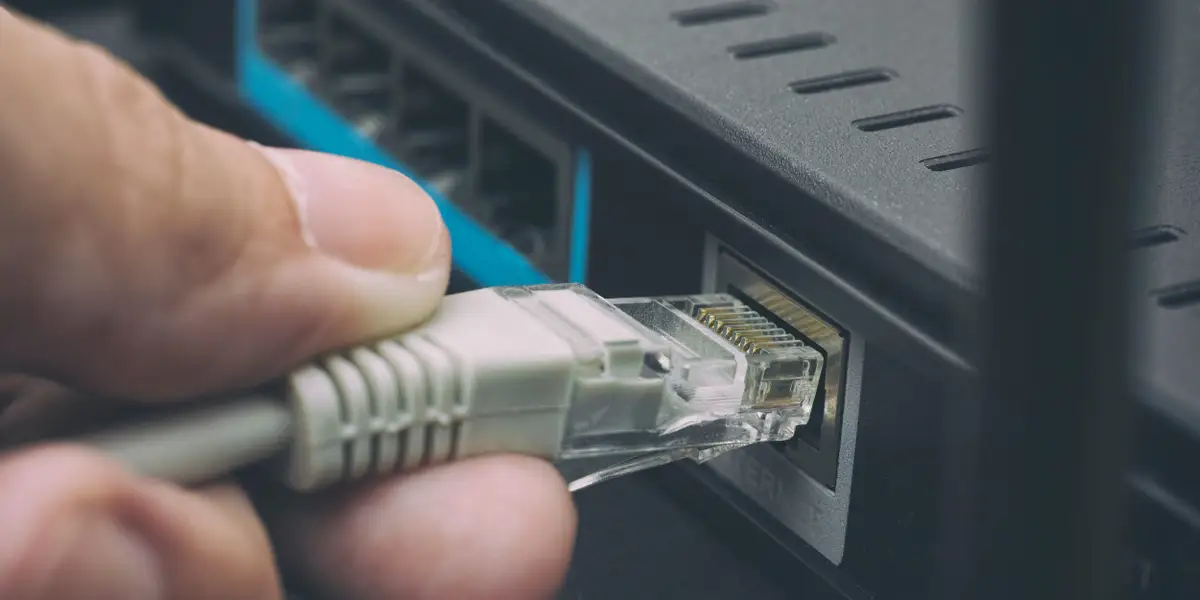
If you’ve ever set up a computer, router, or gaming console, you’ve likely come across an Ethernet cable. But many people still wonder: what does Ethernet cable look like? In this guide, we’ll break it down with descriptions, examples, and images so you can recognize one instantly and know how it’s used.
Understanding the Purpose of an Ethernet Cable
Before describing its appearance, it’s helpful to know what it does. An Ethernet cable is used to connect devices to a network for fast, stable internet. Unlike Wi-Fi, which is wireless, Ethernet relies on a physical cable connection. This means speed, security, and reliability are higher.
General Appearance of an Ethernet Cable
So, what does Ethernet cable look like?
- Shape: Typically round and flexible, resembling a thicker phone cable.
- Length: Ranges from short 1-foot cords to long 100-foot cables.
- Color: Often blue, gray, yellow, or black, but available in many colors.
- Connectors: Each end has a plastic clip-on connector called an RJ45 plug.
The RJ45 Connector – The Key Identifier
One of the easiest ways to spot an Ethernet cable is by its connector.
- Looks like a larger phone plug (RJ11).
- Has 8 small metal contacts inside.
- Comes with a plastic clip that clicks into place when connected.
If you’re holding a cable with this kind of plug, chances are it’s Ethernet.
Ethernet Cable Colors and Their Meanings
While colors don’t change how a cable works, they are often used for organization.
- Blue: Common for home and office networks.
- Yellow/Orange: Often used for special connections (like POE devices).
- Black/White: Blends in for home setups.
- Red/Green: Sometimes used to differentiate networks.
When asking what does Ethernet cable look like, remember that color is not a defining feature—function is.
Types of Ethernet Cables by Category
Different categories (or “Cat” ratings) affect speed and performance.
- Cat5e: Basic, supports up to 1 Gbps speeds.
- Cat6: Faster, supports 10 Gbps up to short distances.
- Cat6a: Shielded, supports 10 Gbps at longer distances.
- Cat7/Cat8: High-end, for data centers and ultra-fast connections.
All look similar, but markings on the side of the cable reveal the category.
Flat vs. Round Ethernet Cables
Not all Ethernet cables look the same.
- Round Cables: Traditional, durable, with better shielding.
- Flat Cables: Slimmer, easier to run under carpets or behind furniture.
So, when you ask what does Ethernet cable look like, the answer depends on the type you buy.
Shielded vs. Unshielded Ethernet Cables
- Unshielded Twisted Pair (UTP): Standard for homes. Flexible, affordable.
- Shielded Twisted Pair (STP): Has extra protection against interference, often thicker.
Visually, shielded cables may appear bulkier.
How Ethernet Cables Differ from Other Cables
People sometimes confuse Ethernet with:
- Phone Cables: Smaller, only 4–6 pins.
- HDMI Cables: Used for video, much thicker.
- USB Cables: Smaller connectors, universal data transfer.
When in doubt, check for the RJ45 connector—that’s the signature look of Ethernet.
Where You’ll Commonly See Ethernet Cables
Ethernet cables are everywhere, even if you don’t notice them:
- Behind Wi-Fi routers and modems.
- Connecting desktop computers or gaming consoles.
- Inside offices, running between wall ports and switches.
- In server rooms, bundled in large groups.
Recognizing them in these setups makes it easier to answer what does Ethernet cable look like.
Choosing the Right Ethernet Cable for Your Needs
Now that you know what does Ethernet cable look like, here’s how to choose:
- For home internet: Cat5e or Cat6.
- For gaming or streaming: Cat6 or Cat6a.
- For professional setups: Cat7 or Cat8.
- For hiding under carpets: Flat cables.
Conclusion
So, what does Ethernet cable look like? It’s typically a round or flat cable with an RJ45 connector on both ends, often in colors like blue, black, or yellow. While all Ethernet cables look similar, small differences—like category, shielding, and shape—help you choose the right one for your needs. Next time you see one behind your router or computer, you’ll know exactly what you’re looking at.
FAQs
1. What does Ethernet cable look like compared to a phone cable?
An Ethernet cable is larger and has 8 pins in the connector, while a phone cable is smaller with 4–6 pins.
2. Can Ethernet cables be any color?
Yes, Ethernet cables come in many colors like blue, black, gray, yellow, and red. The color is mainly for organization.
3. Do all Ethernet cables look the same?
No, some are round, some are flat, and some are shielded (thicker) while others are unshielded (thinner).
4. How do I know if my cable is Cat5e, Cat6, or Cat7?
Look at the printed text along the cable’s side. It usually states the category (e.g., “Cat6”).
5. Is Ethernet cable the same as a LAN cable?
Yes, “Ethernet cable,” “LAN cable,” and “network cable” are often used interchangeably.
Also read: How to Play YouTube Music on Alexa Devices (Step-by-Step Guide)
